

Most product managers do not have a tooling problem. They have a tool-sprawl problem. The PRD lives in one app, the sprint board in another, the roadmap in a third, the retro notes in a doc nobody reopens, and the status update gets rebuilt by hand every Friday. ClickUp’s entire pitch is to collapse that sprawl into one place — and in 2026 it also brings the AI into the same window. This is a practitioner’s guide to ClickUp for product managers — whether it actually helps, and where it doesn’t.
I have run product across thirty years and more tools than I can count. So I will be blunt about the trade-offs, not just the features — because the honest answer to “should a PM use ClickUp?” is “it depends,” and this article is about what it depends on.
Disclosure: some links below are affiliate links. If you start a paid ClickUp plan through them, VetAI Works may earn a commission at no extra cost to you. I only recommend tools I would set up myself.
Want to try it? ClickUp has a free-forever plan — enough to stand up a PM workspace today.
Start ClickUp free →Where ClickUp actually fits for a PM
ClickUp is an “all-in-one” work platform: tasks, Docs, goals, whiteboards, dashboards, and chat under one roof, with unusually deep customization. For a product manager, the appeal is specific — you can keep the PRD, the backlog, the roadmap, and the reporting in a single system instead of stitching four tools together.
The trade-off is the flip side of that flexibility: ClickUp can be over-configurable. A blank workspace gives you a hundred ways to model your work, and it is easy to spend an afternoon building views instead of shipping. The teams that win with ClickUp treat that customization as a one-time setup cost, then leave it alone. Build where it earns its keep; resist the urge to keep tinkering.
The PM workflow, mapped to ClickUp
Here is how the core product-management loop maps onto ClickUp’s building blocks — and where its built-in AI, ClickUp Brain, can take the first pass:
| PM job | ClickUp feature | Where AI helps |
|---|---|---|
| Write the PRD | Docs (linked to tasks) | Draft structure from notes; summarize; flag gaps |
| Run the sprint | List / Board views + Sprints | Generate subtasks from a story; write acceptance criteria |
| Plan the roadmap | Timeline / Gantt + Goals | Roll up status; surface slipping milestones |
| Retro | Whiteboard + Docs | Cluster notes into themes; draft action items |
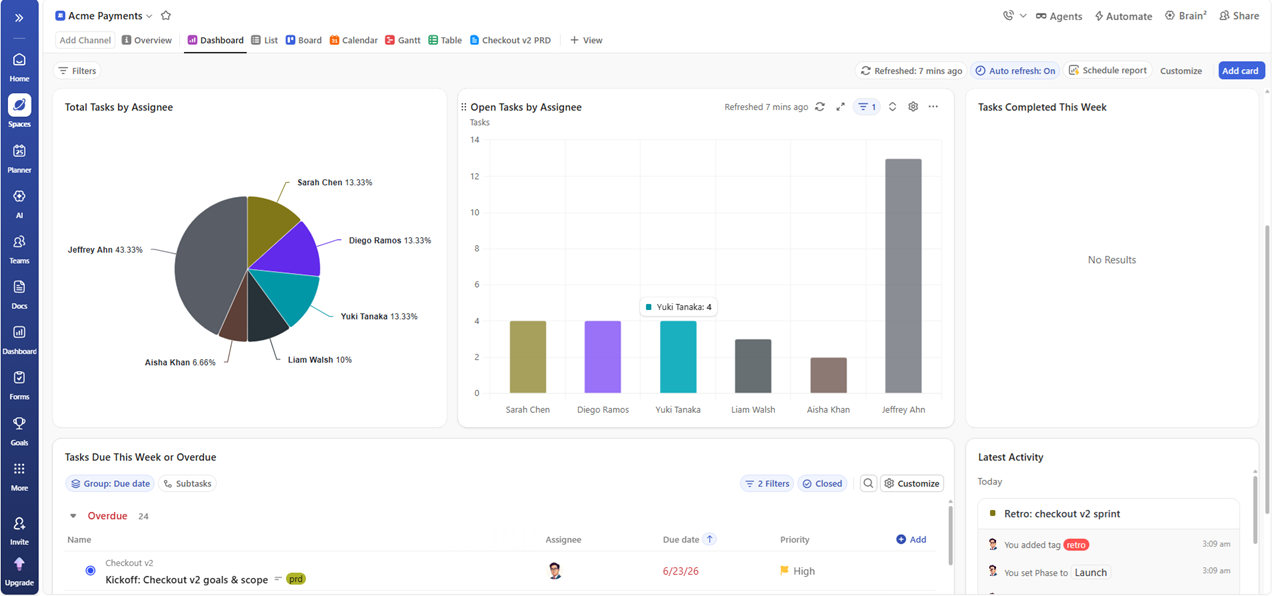
| Stakeholder update | Dashboards | Summarize the week into a readable update |
The point of the table is not that ClickUp invents any of this — it is that all five live in one place, so the PRD in Docs links to the sprint tasks, which roll up to the roadmap, which feeds the dashboard. That linkage is the actual value; the individual features are commodities.
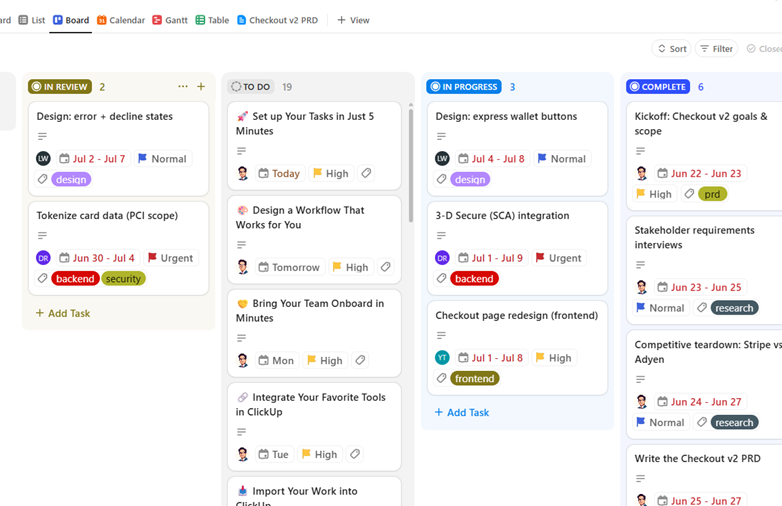
ClickUp Brain: where the AI earns its keep
ClickUp Brain is the native AI layer. For a PM, the genuinely useful moves are the same “mechanical” ones AI is good at everywhere:
- Summarize a long comment thread or a messy Doc into “what was decided and what’s open”
- Draft the weekly stakeholder update from the tasks that actually moved
- Generate subtasks and acceptance criteria from a one-line story
- Ask across the workspace — “what’s blocking the payments epic?” — instead of hunting
And the same rule from every other VetAI guide holds here: AI drafts, the human decides. Brain will happily summarize a thread and quietly drop the one caveat that mattered, or generate subtasks that miss the integration nobody wrote down. Treat its output as a fast first pass you edit — never as the record of truth. The PM’s judgment about what’s real, what’s risky, and what matters is exactly the part it cannot do.
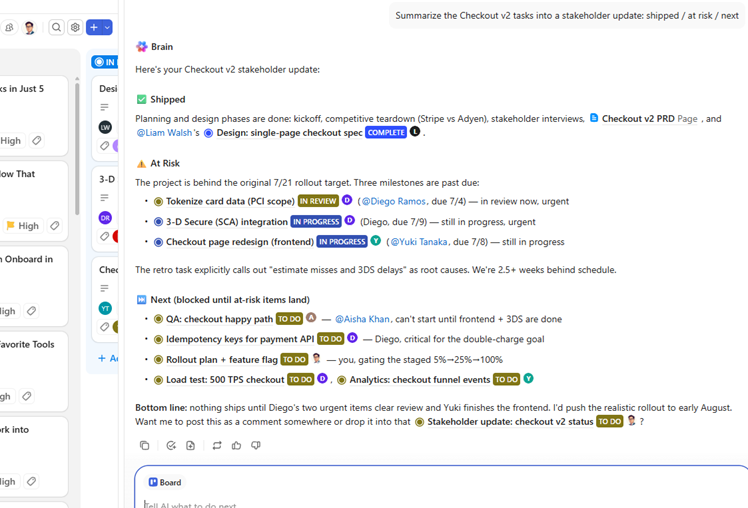
The honest pricing picture (2026)
ClickUp’s plans, billed annually, are Free Forever ($0), Unlimited (~$7/user/mo), Business (~$12/user/mo), and Enterprise (custom). The important 2026 change is the AI: the old flat add-on is gone. ClickUp Brain is now about $9/user/mo and a fuller “Everything AI” tier about $28/user/mo, both metered against a pool of usage credits and both requiring a paid plan.
| Plan | Price (annual) | Best for |
|---|---|---|
| Free Forever | $0 | Solo PM or a trial run — unlimited tasks, capped storage/features |
| Unlimited | ~$7/user/mo | Small teams that need Gantt, integrations, dashboards |
| Business | ~$12/user/mo | Growing teams needing advanced automation & permissions |
| + ClickUp Brain | ~$9/user/mo | Add native AI on top of a paid plan |
Two honest caveats. First, the free plan is a real starting point but caps storage and limits some power features, so a working team usually lands on Unlimited or Business. Second, the AI is now a metered add-on — budget for it deliberately rather than assuming it’s included. (Prices move; check the current numbers before you commit a budget.)
A realistic setup, in an afternoon
For a ~20-person product team, a usable ClickUp PM workspace is roughly a half-day of setup: one Space for the product, a Docs folder for PRDs, a List with Board and Sprint views for delivery, a Timeline for the roadmap, and one Dashboard for the weekly update. Turn on Brain, wire the PRD Doc to its epic, and the weekly status you used to rebuild by hand becomes a summarize-and-edit task. The setup is front-loaded; the payoff is every Friday after.
→ The prompts I paste into ClickUp Brain (and any AI): the PM’s AI Toolkit, 16 prompts
See it in action — a messy epic → a shippable update
⚠ At risk: billing migration (blocked on vendor)
→ Next week: close migration, start reporting v2
The mistakes to avoid
- Over-building the workspace. Custom fields and views are seductive. Configure once for how your team actually works, then stop.
- Trusting AI summaries as the record. Brain is a drafting partner. Verify decisions and risks against reality before they go to stakeholders.
- Paying for AI you won’t use. Start on the free or Unlimited plan, prove the workflow, then decide whether Brain’s credits earn their monthly cost.
Consolidate your PM stack — start free
| Docs, tasks, roadmap, dashboards | One workspace |
| Native AI (ClickUp Brain) | Summarize · draft · generate |
Get the full prompt library
Each VetAI pack is a focused set of battle-tested prompts for one PM job — grab the one that matches your work, or the Bundle for all three.
| Pack | Prompts | For | Price |
|---|---|---|---|
| PM’s AI Toolkit | 16 | PRDs, sprints, stakeholder comms | $79 |
| Software Estimation Pack | 14 | Effort estimates, delivery forecasts | $79 |
| Due Diligence Pack | 12 | Vendor eval, build-vs-buy | $79 |
| Complete Bundle | 42 | All three packs, one download | $199 · save $38 |
FAQ
Is ClickUp good for product managers?
Yes, particularly if you want the PRD, backlog, roadmap, and reporting in one system instead of four. The cost is setup complexity — ClickUp is highly customizable, so decide your structure once and resist over-tinkering.
Is the ClickUp free plan enough for a PM?
For a solo PM or a trial, yes — unlimited tasks and Docs. A working team usually needs Unlimited or Business for Gantt, integrations, and dashboards, and storage on free is capped.
Is ClickUp Brain worth it?
If your team writes a lot — updates, PRDs, retros — the summarize-and-draft time saved adds up. It’s a metered add-on on top of a paid plan (~$9/user/mo in 2026), so prove the workflow first, then turn it on.

Founder, VetAI Works · 30 years in product & IT. Writes practitioner guides on AI for product managers.